 Embark on the "Dimensional Escape Quest" where you wake up in a mysterious forest maze that's not quite of this world. Navigate singing squirrels, mischievous nymphs, and grumpy wizards in a whimsical labyrinth that may lead to otherworldly surprises. Will you conquer the enchanted maze or find yourself lost in a different dimension of magical challenges? The journey unfolds in this mystical escape!
#Quick Look
#Web App
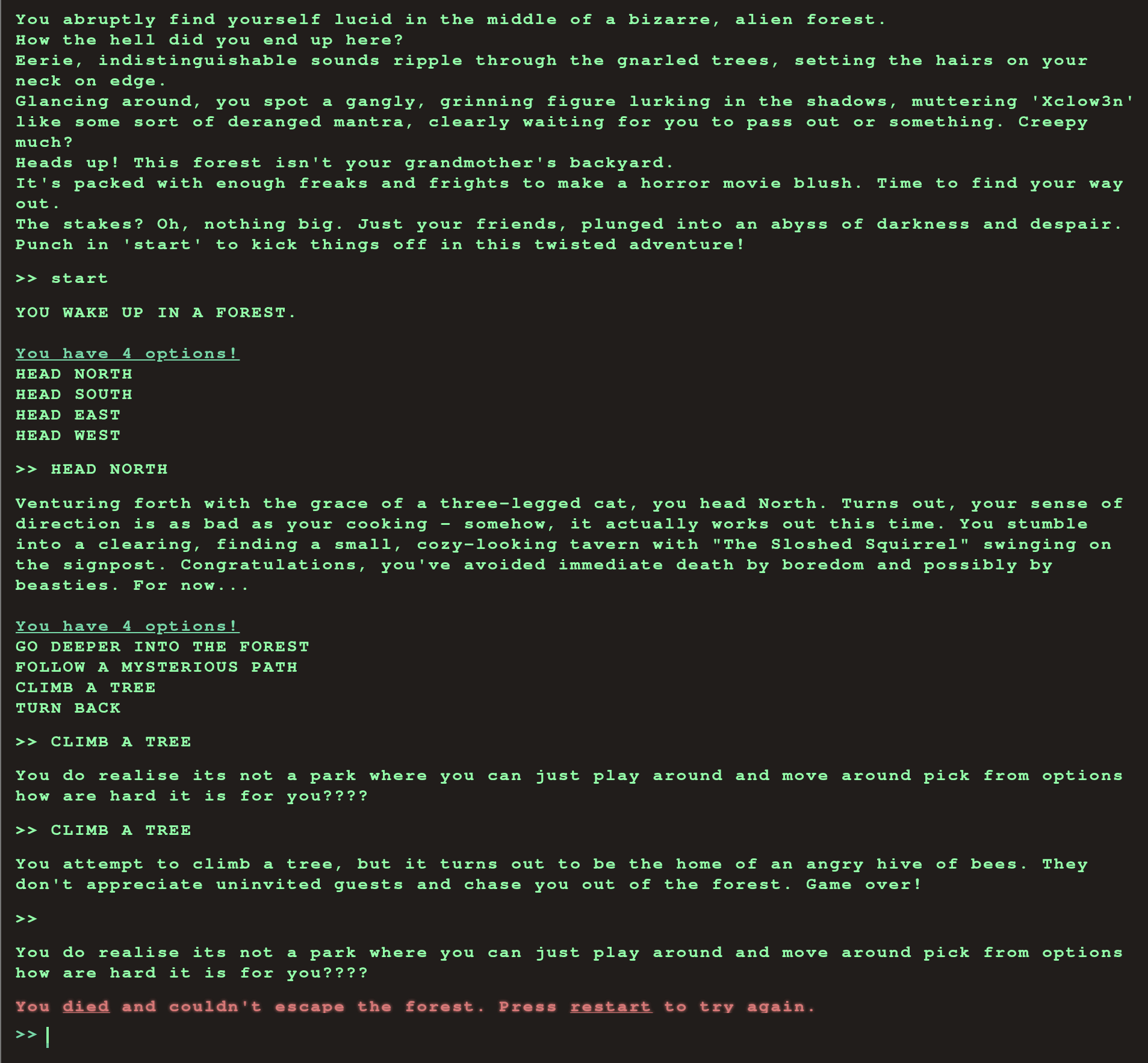
On a quick look of the application it appears to be fairly old school terminal game but within the browser instead. The commands are fairly limited and it is a really short experience. Not too much to gather from this, so let's look at the behind the scenes.
#Proxy Data
I use Burpsuite to proxy my browser connections, I have the professional version but the community edition would also work for this.
#All requests

Pretty generic so far, we have some JavaScript libraries, a few posts. Nothing extravagant is really happening behind the scenes. So let's have a look at the javascript libraries and see if we can sus out any information.
#main.js
The main js file is probably the largest of the bunch, but the important bits are fairly front-loaded. We can see that there are numerous references to Commands and HTTP Requests logic based on the commands.
if (availableOptions[currentStep].includes(currentCommand) || availableOptions['secret'].includes(currentCommand)) {
        await fetch('/api/monitor', {
            method: 'POST',
            headers: {
                'Content-Type': 'application/json'
            },
            body: JSON.stringify({ 'command': currentCommand })
        })
            .then((res) => res.json())
            .then(async (data) => {
                console.log(data)
                await displayLineInTerminal({ text: data.message });

                if(data.message.includes('Game over')) {
                    playerLost();
                    fetchingResponse = false;
                    return;
                }

                if(data.message.includes('HTB{')) {
                    playerWon();
                    fetchingResponse = false;

                    return;
                }

                if (currentCommand == 'HEAD NORTH') {
                    currentStep = '2';
                }
                else if (currentCommand == 'FOLLOW A MYSTERIOUS PATH') {
                    currentStep = '3'
                }
                else if (currentCommand == 'SET UP CAMP') {
                    currentStep = '4'
                }

                let lineBreak = document.createElement("br");


                beforeDiv.parentNode.insertBefore(lineBreak, beforeDiv);
                displayLineInTerminal({ text: '<span class="command">You have 4 options!</span>' })
                displayLinesInTerminal({ lines: availableOptions[currentStep] })
                fetchingResponse = false;
            });
Two big bits of information we need to take from this though are that there does appear to be logic for inputting a "secret" command, and that the only way to win is to get the application to respond with 'HTB{'. So we probably can't just spam the game to find the "winning combination" here.
#Game.js
import { displayLineInTerminal } from "./main.js";
import { GAME_LOST, GAME_WON } from "./commands.js";

// GAME MECHANICS
// ---------------------------------------
const timeDelay = 1000;

function displayGameResult(message, style) {
    setTimeout(() => {
        displayLineInTerminal({
            text: message,
            style: `${style} margin-right`,
            useTypingEffect: true,
            addPadding: true,
        });
    }, timeDelay);
}

export function playerLost() {
    displayGameResult(GAME_LOST, "error");
}

export function playerWon() {
    displayGameResult(GAME_WON, "success");
}
Nothing really of interest here, we have already sussed out the logic in how to win, and everything else appears to just be about delays in which to serve messages to the player.
#Commands.js
export const START = 'YOU WAKE UP IN A FOREST.';

export const INITIAL_OPTIONS = [
    '<span class="command">You have 4 options!</span>',
    'HEAD NORTH',
    'HEAD SOUTH',
    'HEAD EAST',
    'HEAD WEST'
];

export const GAME_LOST =  'You <span class="command error">died</span> and couldn\'t escape the forest. Press <span class="command error">restart</span> to try again.';

export const GAME_WON = 'You <span class="command success">escaped</span> the forest and <span class="command success">won</span> the game! Congratulations! Press <span class="command success">restart</span> to play again.';

export const INFO = [
    "You abruptly find yourself lucid in the middle of a bizarre, alien forest.",
    "How the hell did you end up here?",
    "Eerie, indistinguishable sounds ripple through the gnarled trees, setting the hairs on your neck on edge.",
    "Glancing around, you spot a gangly, grinning figure lurking in the shadows, muttering 'Xclow3n' like some sort of deranged mantra, clearly waiting for you to pass out or something. Creepy much?",
    "Heads up! This forest isn't your grandmother's backyard.",
    "It's packed with enough freaks and frights to make a horror movie blush. Time to find your way out.",
    "The stakes? Oh, nothing big. Just your friends, plunged into an abyss of darkness and despair.",
    "Punch in 'start' to kick things off in this twisted adventure!"
];

export const CONTROLS = [
    "Use the <span class='command'>arrow</span> keys to traverse commands in the command history.",
    "Use the <span class='command'>enter</span> key to submit a command.",
];

export const HELP = [
    '<span class="command help">start</span> Start the game',
    '<span class="command help">clear</span> Clear the game screen',
    '<span class="command help">audio</span> Toggle audio on/off',
    '<span class="command help">restart</span> Restart the game',
    '<span class="command help">info</span> Show info about the game',
];
These are simply containers for the list of commands displayed to the player, which appropriate HTML tags to ensure that they display correctly with styling when they are called in. No mention of any secret flag, but this should be expected since it doesn't get displayed to the player.
#API Options
{
  "allPossibleCommands": {
    "1": [
      "HEAD NORTH",
      "HEAD WEST",
      "HEAD EAST",
      "HEAD SOUTH"
    ],
    "2": [
      "GO DEEPER INTO THE FOREST",
      "FOLLOW A MYSTERIOUS PATH",
      "CLIMB A TREE",
      "TURN BACK"
    ],
    "3": [
      "EXPLORE A CAVE",
      "CROSS A RICKETY BRIDGE",
      "FOLLOW A GLOWING BUTTERFLY",
      "SET UP CAMP"
    ],
    "4": [
      "ENTER A MAGICAL PORTAL",
      "SWIM ACROSS A MYSTERIOUS LAKE",
      "FOLLOW A SINGING SQUIRREL",
      "BUILD A RAFT AND SAIL DOWNSTREAM"
    ],
    "secret": [
      "Blip-blop, in a pickle with a hiccup! Shmiggity-shmack"
    ]
  }
}
Now this is where it gets interesting. Within the API options call that happens in the background, we see a list of all possible commands. Ones which we are already aware of, and the actual text for the "secret" command that was referenced earlier. Now that we understand how the application works this should be a very quick exploitation.
#Flag
Using our knowledge of the web application, we will take the text of the "secret" command, and paste it into the game. Doing so should trip the logic into a "win" and get us the flag for completion.

If you have an issue copying the flag itself, just right click on that area of the web page, and click Inspect, or View Page Source. That will allow you to more easily copy it out.
HTB{D3v3l0p3r_t00l5_4r3_b35t__t0015_wh4t_d0_y0u_Th1nk??}